
Microsoft recently released .NET 10 with a new feature called .NET Scripting. Here i will discuss about what's csharp scripting?
Intro
As a senior developer, I’m mentoring some junior colleagues and I’ve noticed that many of them write console applications just to test their code. They often ask me why our projects contain so many files—such as proj, bin, and build—when all they’re doing is writing a simple “Hello World” application. I’ve already given them detailed explanations, but they still don’t seem convinced. Now , Finally Microsoft released .NET 10 with a new feature called .NET Scripting.
How to create a csharp Script
Example:-1
Assume we are creating a simple application to print “Hello World”. below the way you can create a .NET Script.
Console.WriteLine("Hello, World!");Console.WriteLine("This is a demo C# file.");dotnet run demo.csHello, World!This is a demo C# file.Example:-2
What if we need to add external packages? In other words, can we reference NuGet packages inside a .NET Script? The answer is yes — you can import NuGet packages directly into your script, making it possible to use third‑party libraries at runtime. Examlple,
#:package Newtonsoft.Json@13.0.4Where I can get the packages?
You can find the packages on nuget.org. Simply search for the package name under the File-based Apps tab to access them.
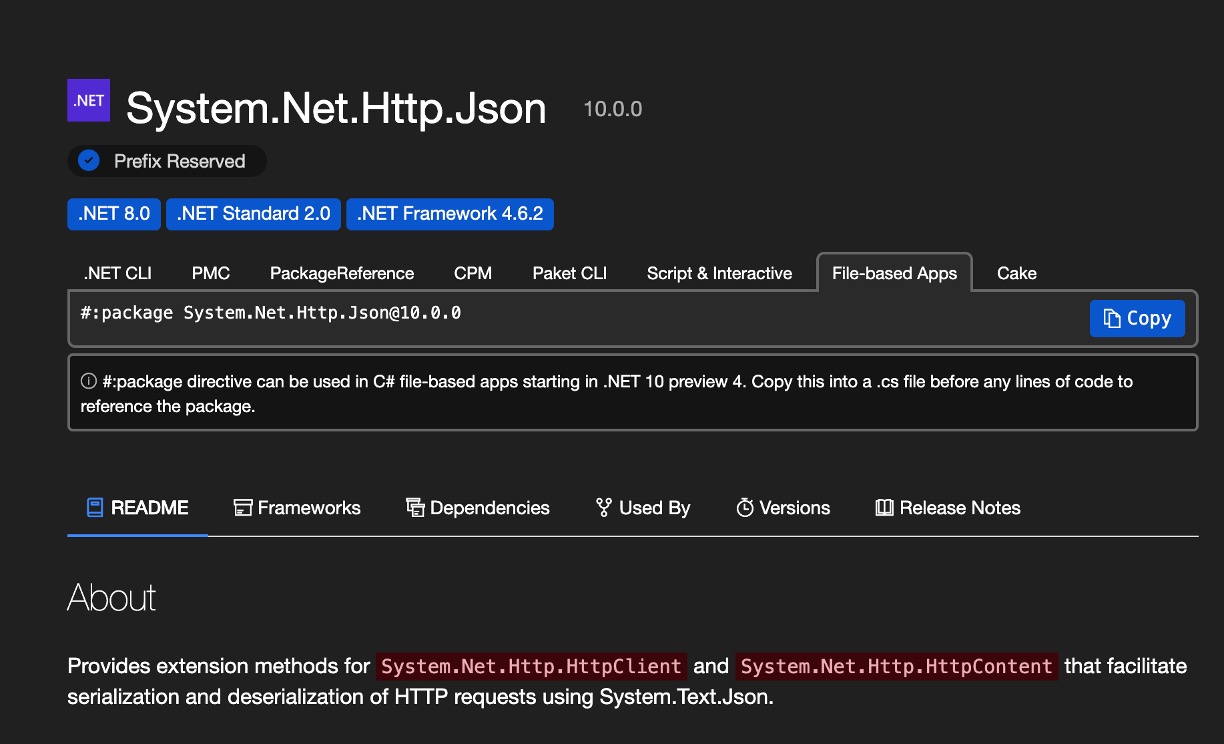
Here , This is sample code to convert json to c# object.
#:package Newtonsoft.Json@13.0.4
using Newtonsoft.Json;
var obj = new { Name = "Mani", Role = "Azure Developer" };string json = JsonConvert.SerializeObject(obj, Formatting.Indented);
Console.WriteLine(json);
to run this code, you need to run the following command in the terminal.
dotnet run jsonResultScript.csResult:
{ "Name": "Mani", "Role": "Azure Developer"}Example:-3
Scripting is not only limited to console applications. You can also use it to create web applications, desktop applications, and more. Here , I have added a sample code to CRUD operations using .NET Script.
#:package Microsoft.Data.SqlClient@7.0.0-preview2.25289.6
using Microsoft.Data.SqlClient;
string connectionString      = "Server=***;Database=AdventureWorks;User Id=sa;Password=**;Encrypt=False;TrustServerCertificate=True;";string query = @"INSERT INTO AdventureWorks.dbo.ErrorLog( ErrorTime, UserName, ErrorNumber, ErrorSeverity, ErrorState, ErrorProcedure, ErrorLine, ErrorMessage)VALUES(getdate(), 'Demo', 0, 0, 0, '', 0, 'test message');";string selectQuery = "SELECT TOP 10 * FROM AdventureWorks.dbo.ErrorLog";try{    using (SqlConnection connection = new SqlConnection(connectionString))    using (SqlCommand command = new SqlCommand(query, connection))    {        connection.Open();        int result = command.ExecuteNonQuery();        connection.Close();        Console.WriteLine($"Rows affected: {result}");    }    using (SqlConnection connection = new SqlConnection(connectionString))    using (SqlCommand command = new SqlCommand(selectQuery, connection))    {        connection.Open();        using (SqlDataReader reader = command.ExecuteReader())        {            while (reader.Read())            {                Console.WriteLine($"ID: {reader["ErrorLogID"]}, " +                                 $"Time: {reader["ErrorTime"]}, " +                                 $"User: {reader["UserName"]}, " +                                 $"Number: {reader["ErrorNumber"]}, " +                                 $"Severity: {reader["ErrorSeverity"]}, " +                                 $"State: {reader["ErrorState"]}, " +                                 $"Procedure: {reader["ErrorProcedure"]}, " +                                 $"Line: {reader["ErrorLine"]}, " +                                 $"Message: {reader["ErrorMessage"]}");            }        }        connection.Close();    }}


catch (Exception ex){    Console.WriteLine(ex.Message);}
and output will be,
Rows affected: 1ID: 1, Time: 23/11/2025 8:05:16 AM, User: , Number: 0, Severity: 0, State: 0, Procedure: , Line: 0, Message:ID: 2, Time: 23/11/2025 8:05:20 AM, User: , Number: 0, Severity: 0, State: 0, Procedure: , Line: 0, Message:ID: 3, Time: 23/11/2025 8:14:10 AM, User: Demo, Number: 0, Severity: 0, State: 0, Procedure: , Line: 0, Message: test messageID: 4, Time: 23/11/2025 8:59:49 AM, User: Demo, Number: 0, Severity: 0, State: 0, Procedure: , Line: 0, Message: test messageID: 5, Time: 23/11/2025 9:00:47 AM, User: Demo, Number: 0, Severity: 0, State: 0, Procedure: , Line: 0, Message: test messageID: 6, Time: 23/11/2025 9:03:50 AM, User: Demo, Number: 0, Severity: 0, State: 0, Procedure: , Line: 0, Message: test messageExample:-4
Here, I will be adding a sample code to create a web api using .NET Script.
ohh… forgot about minimal api, Here , Microsoft opened new doors to create web api using .NET Script.
#:sdk Microsoft.NET.Sdk.Web#:package System.Net.Http.Json@10.0.0
using Microsoft.AspNetCore.Builder;using Microsoft.Extensions.Hosting;using Microsoft.Extensions.DependencyInjection;using System.Text.Json.Serialization;
var builder = WebApplication.CreateBuilder();
builder.Services.ConfigureHttpJsonOptions(options =>{    options.SerializerOptions.TypeInfoResolverChain.Insert(0, AppJsonSerializerContext.Default);});
var app = builder.Build();
app.Urls.Add("http://localhost:5100");
app.MapGet("/", () => "Hello World");
app.MapGet("/employee", () =>{    var emp = new employee(1, "John Doe", "Software Engineer", 75000.00, "IT");    return emp;});
app.Run();
[JsonSerializable(typeof(employee))]internal partial class AppJsonSerializerContext : JsonSerializerContext{}
record employee(int Id, string Name , string Position, double Salary, string Department);
Save this file as app.cs and run it using dotnet run app.cs . its shows output as
// while calling http://localhost:5100/Hello World// while calling http://localhost:5100/employee{ "Id": 1, "Name": "John Doe", "Position": "Software Engineer", "Salary": 75000, "Department": "IT"}I know, its not a production ready code but its just for demo purpose. but it shows the power of .NET Scripting.
In future, I will be adding more examples / completed CRUD operations.
Key Benefits of .NET Scripting
No project setup required
You can run a .cs file directly using dotnet run app.cs without generating .proj, bin, or obj folders A B. This is perfect when juniors (like the ones you mentor) just want to test a snippet of code without dealing with the overhead of project scaffolding.
Rapid prototyping
Great for writing small utilities, proof-of-concept code, or testing new language features (like C# 13 enhancements) without spinning up a full solution B.
Automation & productivity
Developers use scripting for tasks like file manipulation, JSON parsing, or quick data transformations. It’s faster than building a console app and compiling every time C B.
NuGet package support
You can reference and use NuGet packages directly in scripts, making them powerful enough for real-world tasks without needing a full project B.
Learning & teaching
For beginners, scripting reduces friction. They can focus on learning C# syntax and concepts without being distracted by project structure.
Typical Use Cases
Pros:-